





git clone コマンド概要
git cloneは以下の3つの処理を行うコマンドです。
- remoto-repository(リモートリポジトリ)のcommitツリーを元にlocal-repository(ローカルリポジトリ)を作成する
- デフォルトブランチの内容をstaging-area(ステージングエリア)に反映する
- デフォルトブランチの内容をworking-directory(作業ディレクトリ)に反映する
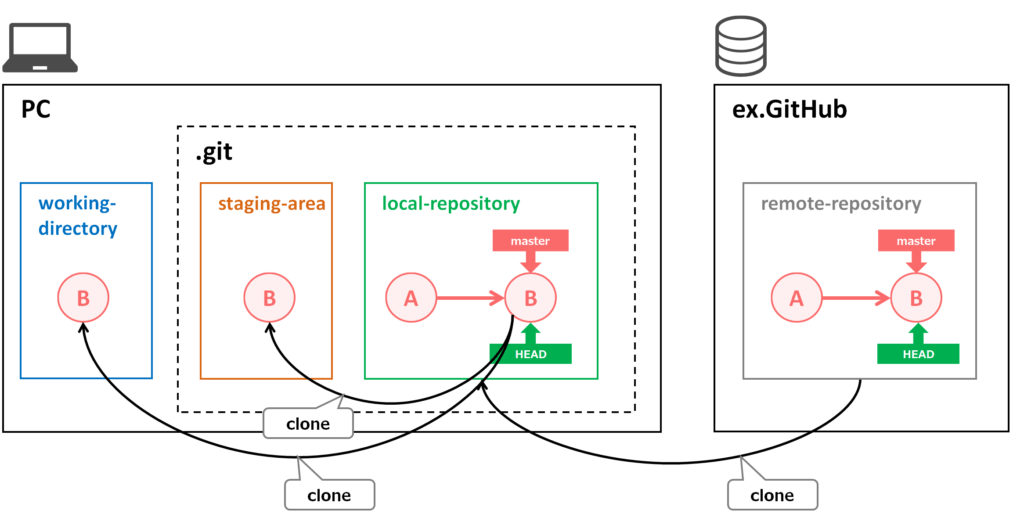
コマンドの使い方
git clone [remote-repository-path] [local-repository-path]remote-repository-pathに指定するパスは「.git」ファイルまでのパスを指定します。
例えば、GitHubの場合は以下のようなパスになります。
https://github.com/[GitHubのアカウント]/xxx.gitまた、local-repository-pathは省略した場合は、remote-repositoryと同じ名前でリポジトリが生成されます。
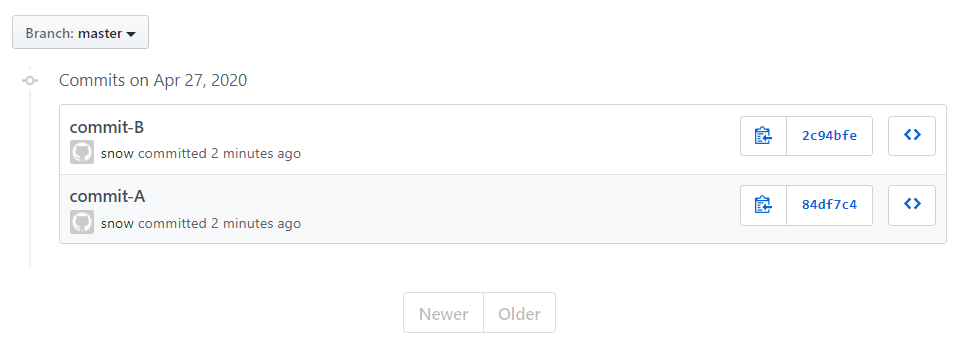
以下のように、masterブランチにcommitが2つある状態のGitHubのリポジトリをgit cloneでローカルリポジトリを生成してみます。
/c/Git
$ git clone https://github.com/[GitHubのアカウント]/clonetest.git
Cloning into 'clonetest'...
remote: Enumerating objects: 6, done.
remote: Counting objects: 100% (6/6), done.
remote: Compressing objects: 100% (3/3), done.
remote: Total 6 (delta 0), reused 6 (delta 0), pack-reused 0
Unpacking objects: 100% (6/6), 431 bytes | 5.00 KiB/s, done.

/c/Git
$ cd clonetest/

/c/Git/clonetest (master)
$ ls
file-A.txt  file-B.txt

/c/Git/clonetest (master)
$ git ls-files
file-A.txt
file-B.txt

/c/Git/clonetest (master)
$ git log --oneline --all
2c94bfe (HEAD -> master, origin/master, origin/HEAD) commit-B
84df7c4 commit-A
git clone の全てのオプションを確認する方法
以下のコマンドを実行するとブラウザでgit cloneのヘルプページが表示される
git clone --helpGitコマンドの使い方一覧
次に読むおすすめ記事
Gitの全体像や基本コマンド、ブランチ運用、トラブル解決手順を体系的に学びたい方は、以下の完全ガイドもあわせて参考にしてください。

【完全版】Git初心者向けガイド|基本コマンドから実務トラブル解決まで
プログラムの開発やWeb制作において、いまや必須スキルとなったバージョン管理システム「Git(ギット)」。しかし、これからGitを学び始める初心者の方にとって、「ワークツリーやステージングなど聞き慣れない言葉が多い」「ブランチやマージの仕組…
snowsystem.net
2026.09.02